
Why would you want to put a DB in docker?
Imagine you're running r&d at a company with hundreds of developers. These days each of those devs isn't writing code; they're prompting, and they're increasingly doing so with multiple efforts running simultaneously.
They also happen to be working on code that's manipulating data in a transactional database, aka systems of record. The thing is, even modestly experienced engineers working on these systems cringe at the thought of rolling out code changes related to the database that are beyond the trivial, as their experience induces a special kind of anxiety: database anxiety. This anxiety only gets worse when it's AI that writes the code, to the point of being debilitating. For this (among other) reasons, we've heard of companies where staff engineers outright refuse AI written or modified code.
To relieve this anxiety and unclog the arrested development, the first go-to measure is to run new versions of code and related database changes on an up to date "carbon copy" of production (typically a subset, sans PII/sensitive data). It makes sense to try out changes on a side copy and get a sense of things before rolling out to the real world.
In modern cloud environments, getting a copy of production to developers, agents and test systems is easier said than done. In theory, there are many solutions for creating carbon copies, also called Test Data Management (TDM): restoring from backup, clone solutions, "branching" in new-age databases, etc, but in a cloud environment they all suffer from a hidden logistical challenge: distribution.
It would be convenient to use any of these above methods, if not for the myriad challenges making it unrealistic to set these up in cloud-native environments:
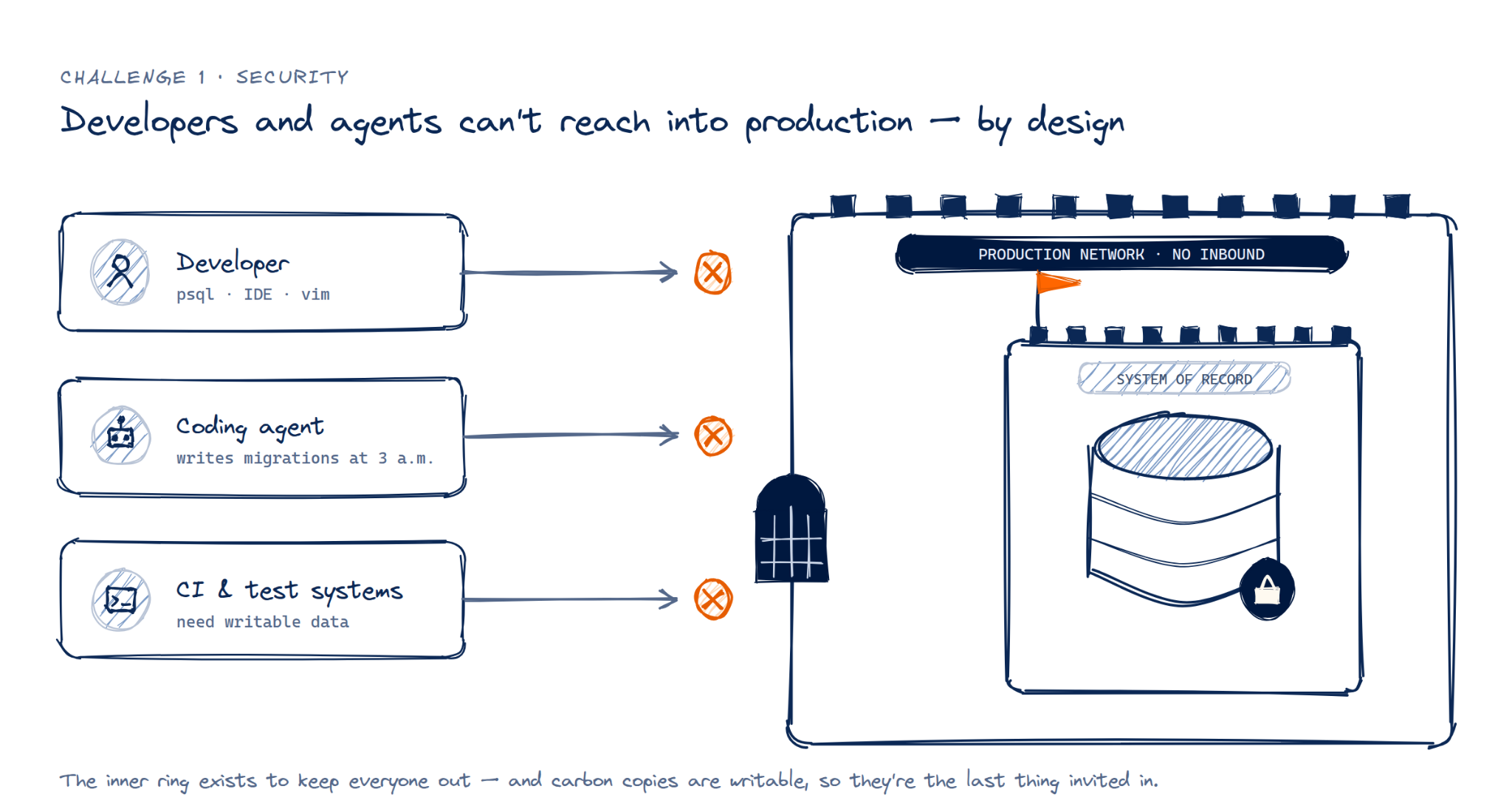
Challenge #1: Security. More often than not, operational/production environments are heavily locked down. Developers, and their agents more so, can't connect to production networks as a measure of layered protection. The thinking is that inviting them inside the inner ring of the guarded castle that is a system of record's operational environment is defeating the purpose of the castle walls themselves - no access unless absolutely necessary, and carbon copies are far from it. Keep in mind this isn't read only access; the carbon copies are writable.
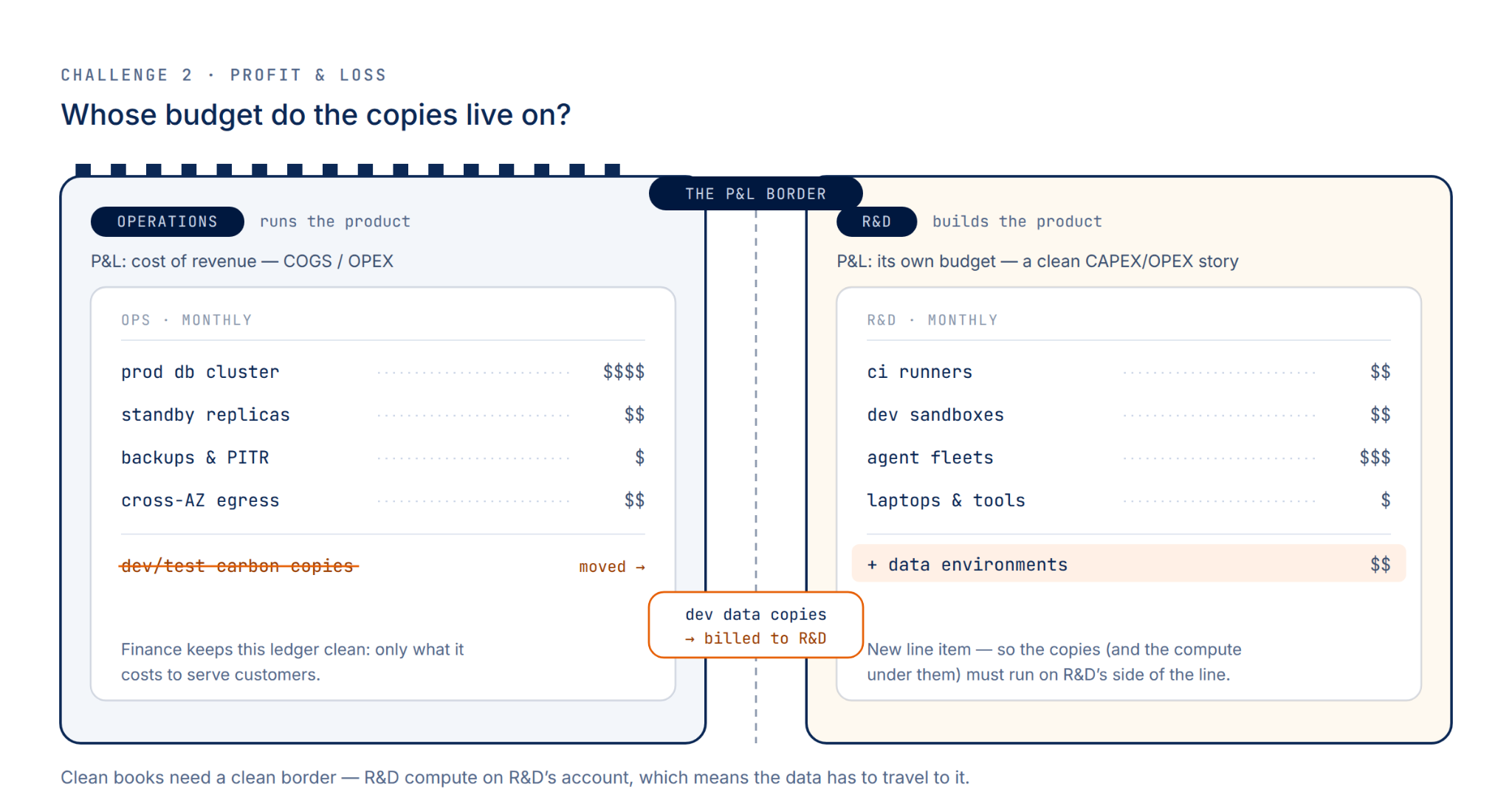
Challenge #2: Profit & Loss. Corporations tend to prefer P&L distinction of their business units, including R&D resources from operations. This allows for proper accounting of COGS, and a well defined border between Operational Expenditures (OPEX) and Capital Expenditures (CAPEX).
Challenges 3 & 4: Proximity and Duplication. As companies grow, they tend to duplicate their production environments for a variety of reasons like geographically distinct environments (EU vs US), contractual obligation for large contracts (separate enterprise accounts), sharding, etc.
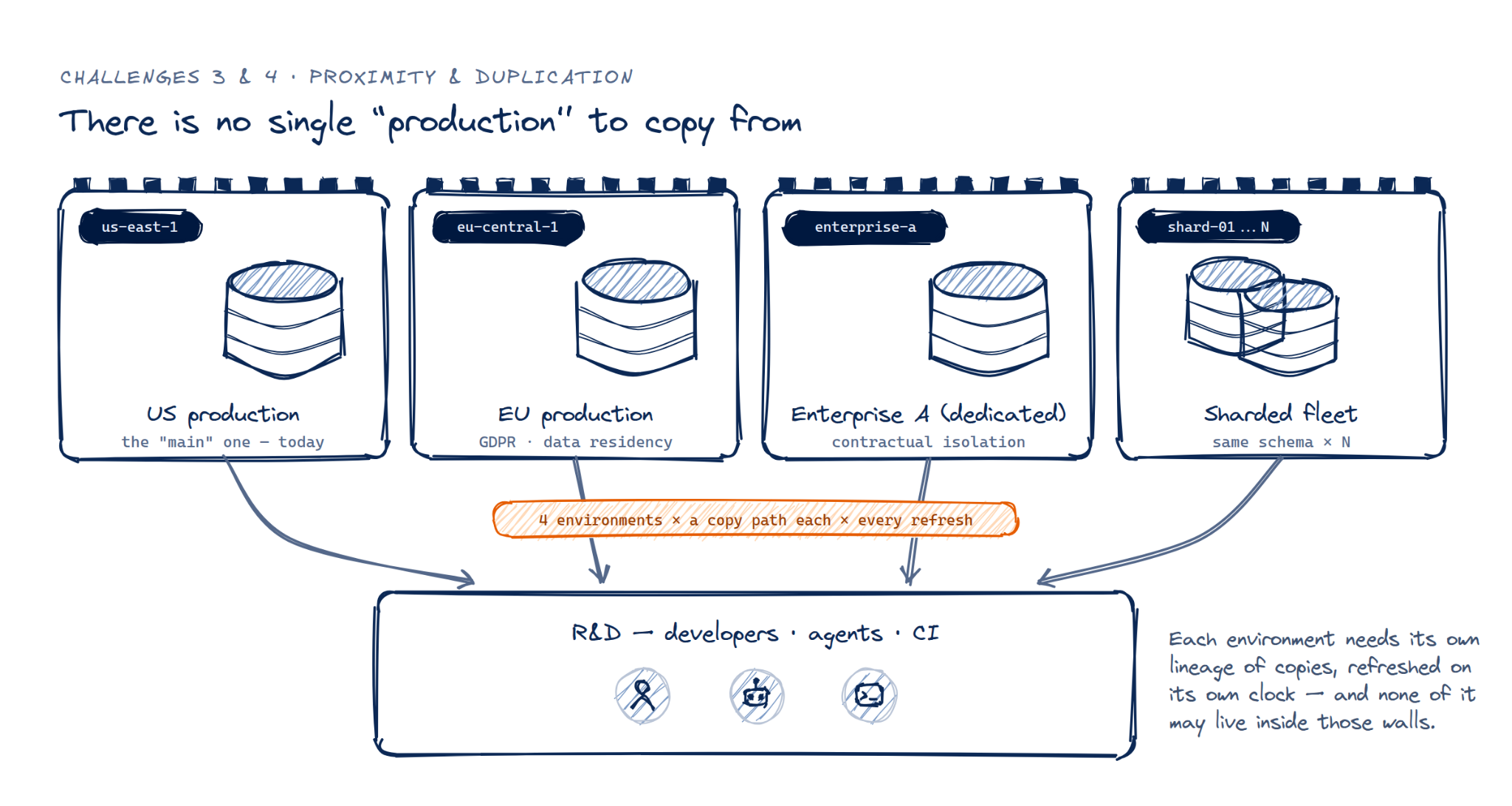
Most companies have some combination of these challenges, so it becomes clear that connecting developers & agents to data in production environments is unfeasible. Therefore it has to be the other way around, the data must find its way to r&d: a (compliant) copy must be transported to where developers & agents can work, preferably in ephemeral environments. The data needs to be distributed.
The obvious tool for this is the one your team already distributes everything else with: Docker. But as we'll see, Docker has a database problem and it shows up exactly when you try to ship real data inside an image.
There are only two alternatives for distribution, either we choose:
Implicit data distribution: encapsulate a production database (e.g. as a docker image) for distribution and integration - the approach this post is really about, and the one Docker breaks.
or -
Explicit data distribution: distribute either the data itself as exports for importing, or copy the database data files themselves for direct mounting.
These map to the two problems the rest of this post tackles:
- Implemented naively, a database in docker is a bad idea
- Distributing the data on day two becomes cumbersome and costly
A Database in Docker is a fool's errand
The industry standard for encapsulating services for distribution is the Docker Image/OCI. It's the widely agreed upon Lego brick of infrastructure. So it would be most convenient if, in the course of constructing a system for development or testing, the database itself would be available as yet another docker image fully self-contained with database binaries, extensions, and the data files themselves. A developer/agent could just docker run ... one or more times, concurrently, and have a "data environment" at its fingertips.
Unfortunately, Docker has a database problem. Any fool can put an instance of a database with its data, extensions and all, into a docker image.
You'd be a fool to do so naively because the default underlying filesystem is ill suited for the task. A look at the intersection between databases and docker storage reveals the issue.
On the one hand, most popular databases (Oracle, MS SQL Server, PostgreSQL, MySQL/MariaDB, MongoDB) store their data in either a file(s)-per-table architecture or a tablespace architecture, where multiple tables' data is mixed in shared files.
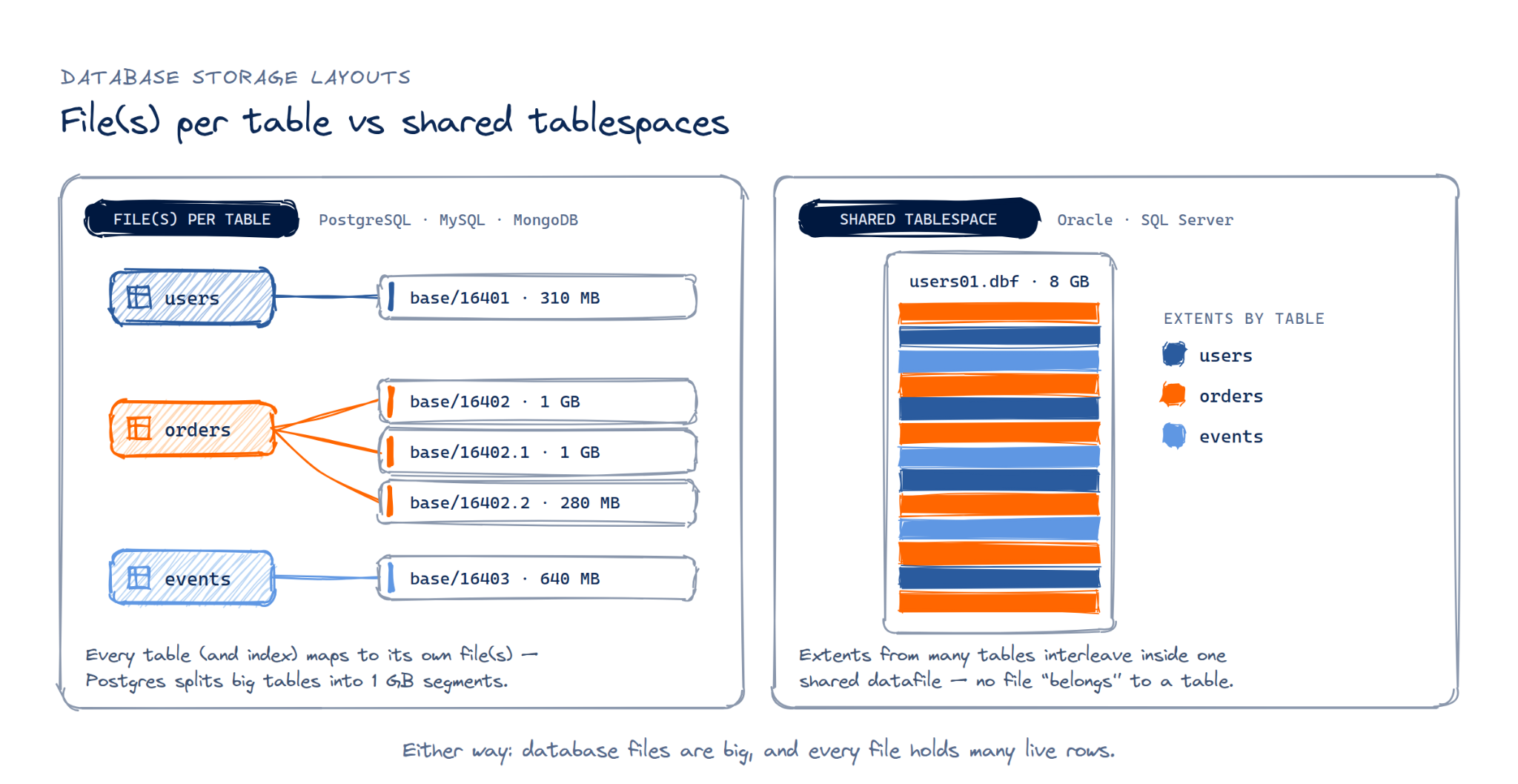
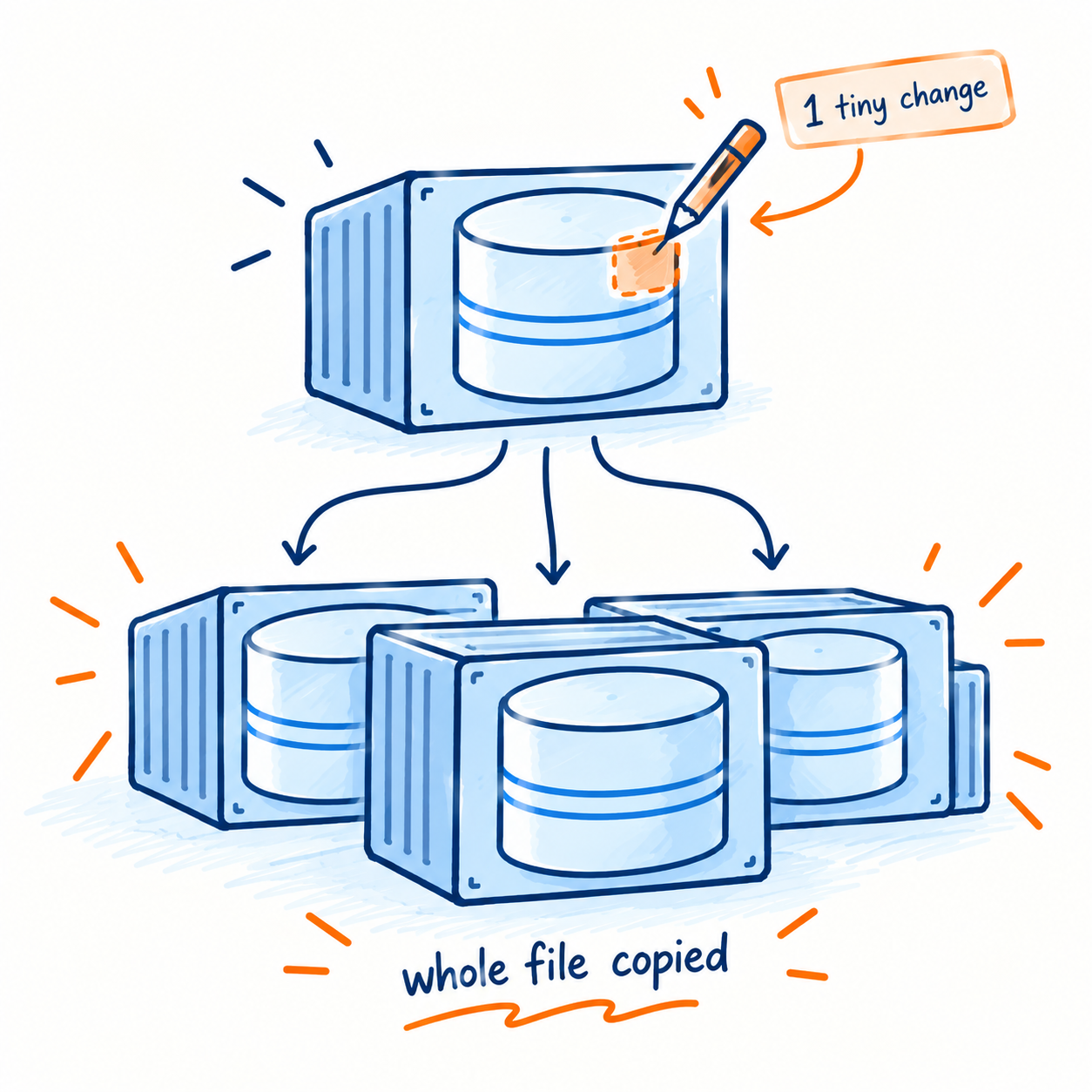
On the other hand, the default storage driver, overlay2, accommodates changes to image files in a container through file copy-on-write, meaning when there's any change in the container to even a single bit of a file in the image, the whole file gets copied.
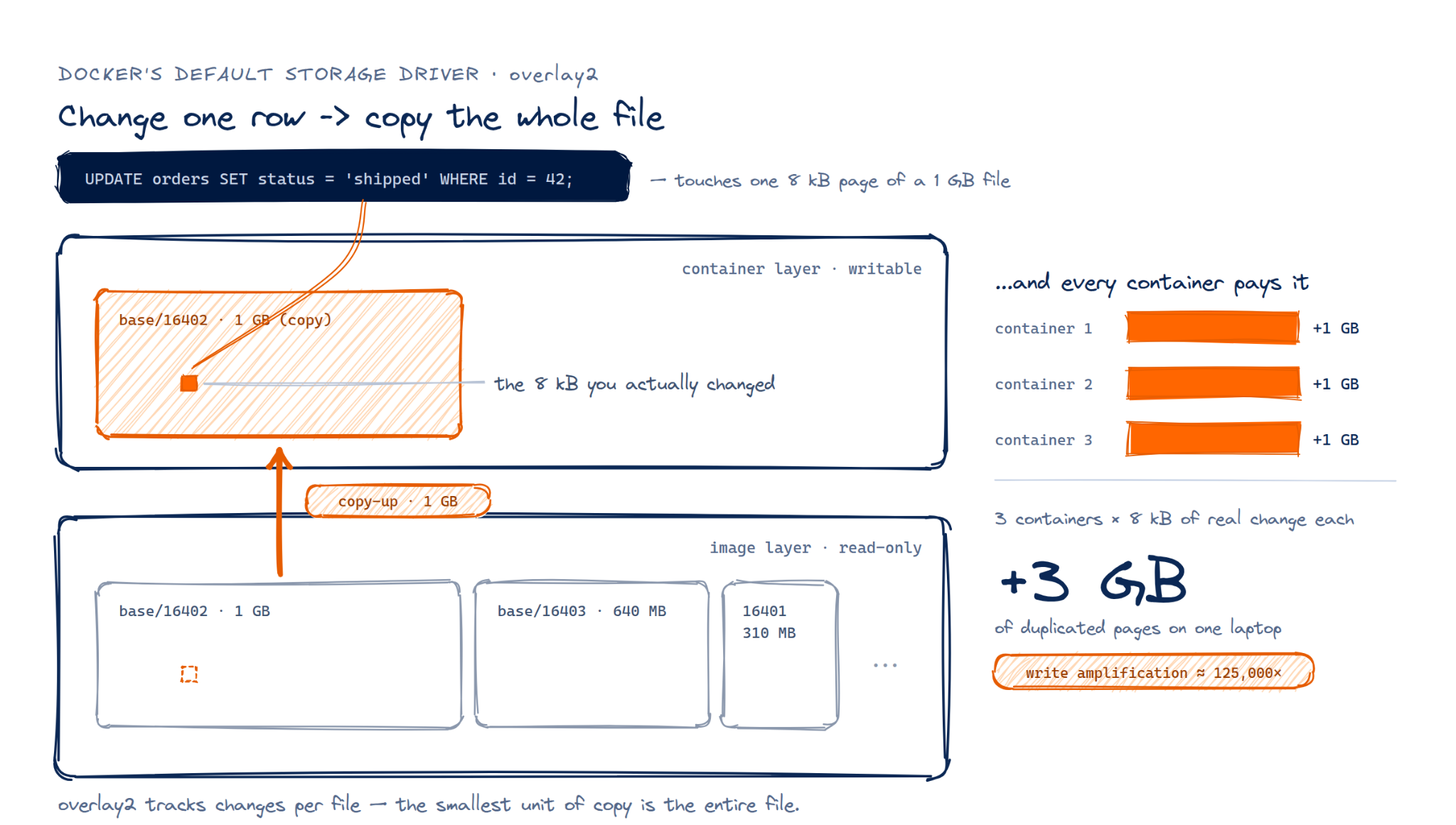
When a database, encapsulated as a docker image with its data in tow, starts up and starts modifying files, those files are copied wholesale. So if a table of 1GB has just one row (or bit) modified, the whole 1GB is copied. It isn't far-fetched to hit the worst case, where every database instance/container created from the same image modifies a small portion of a large set of tables in the DB, resulting in each container multiplying the space on disk required.
The calculation is straight forward:
Note: The Problem with the Alternatives. While there are alternatives to the default storage system that address this issue (eg zfs and btrfs), they're rarely available. Docker Desktop on Mac/Windows use virtual machines and can't leverage the respective operating system's capabilities [1], [2], so running locally on a mac or windows pc makes zfs and btrfs irrelevant. In the cloud, almost all managed container environments don't allow for any non-default storage, Kubernetes requires advanced configuration, and the setup on linux requires tinkering.
Just a handful of containers, created by say a handful of local agents, running off of a single image create a storage problem at even modest database scale.
Distribution - The Day 2 Logistics Challenge
A variety of methods are available to transport data out of production and into ephemeral environments. Whether it be dump/restore scripts, data directory files, cloud snapshots, or the whole database in docker, the repeated process is time-consuming and costly.
The problem with database copies is that it's never a one-time event. Creating the first copy is easy. It's the process of creating copies repeatedly that hurts.
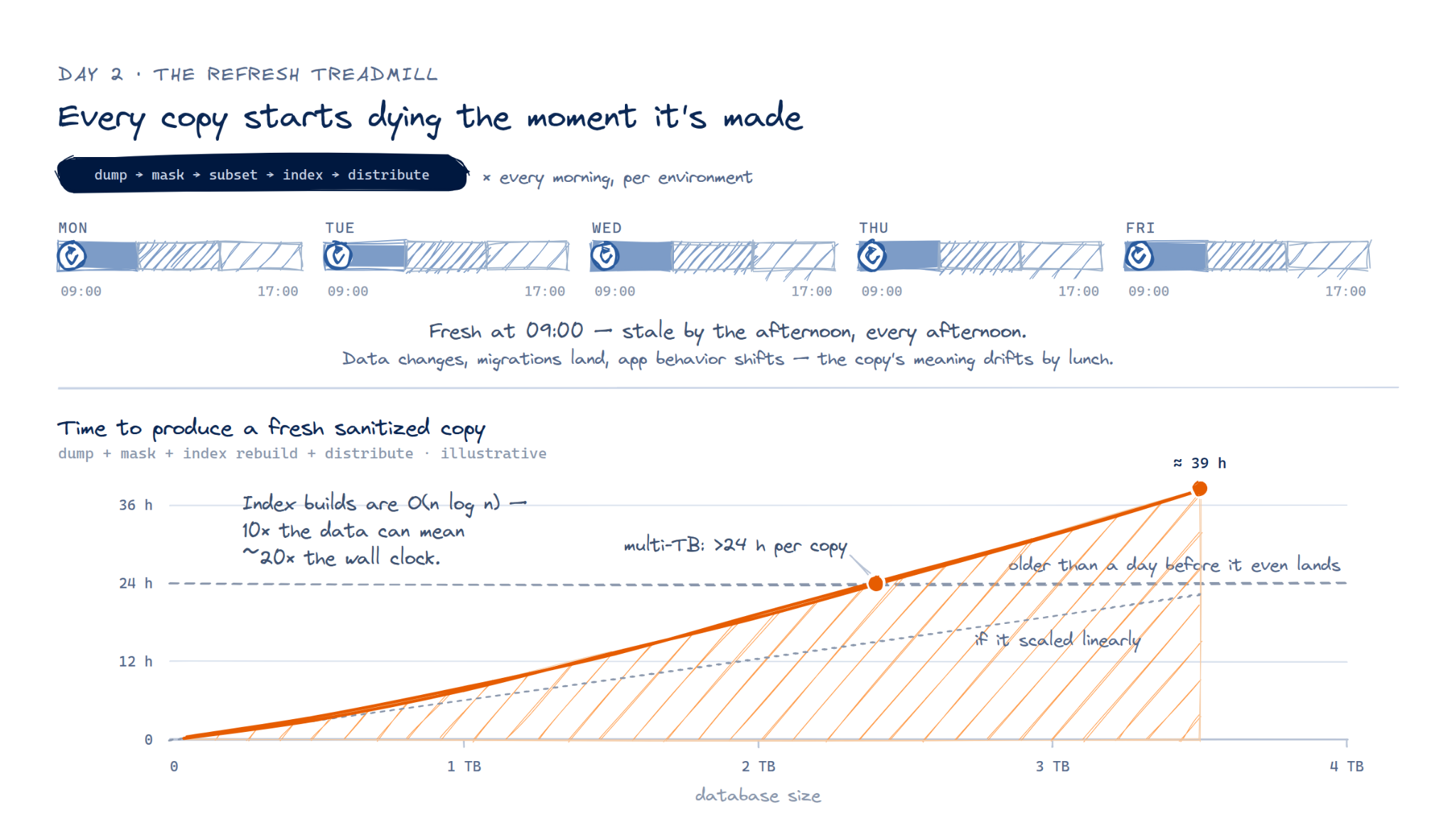
That's because production is a moving target. Copies start going stale as soon as they're created, and in more than one way. Data changes constantly, new code versions come with migrations, and app logic with behavioral changes affect its meaning. Copies created in the morning can be stale by the afternoon.
Creating copies repeatedly becomes a logistics problem, where the day 2 "treadmill" of refreshes, data movement, management of developer environments, and the process itself become a costly burden:
- Schema changes require constant maintenance of the masking script
- Subsetting needs to be constantly tweaked
- Data needs to be copied repeatedly out of the DB, becoming a performance burden
- Data needs to be distributed repeatedly; creating mounting egress costs
- Local copies (eg a local downloaded docker snapshot) require a watchful eye lest they clog up local disk, taking up too much space
- "Server" copies, like k8s instances, need a watchful eye to reap forgotten instances
Above all else is the issue of refresh time. The larger a database gets, the longer it takes to complete a fresh copy & sanitize process. Naively implemented, it can be a worse-than-linear degradation over time: a DB 10x as large can take 20x longer as index creation can require O(nlogn) operations to build. We've heard of organizations with multi-TB databases that need over 24 hours to create a sanitized copy of production, and that's before distribution.
So what would a system that fixes this look like?
Baseshift solves both problems at once
The problems above are symptoms of a missing primitive - a cheap, fresh, block-level copy-on-write solution that produces data copies where you need them.
Baseshift addresses the challenges above by integrating a number of components into one cohesive all-batteries-included end-to-end product, called DubHub:
- A block-level copy-on-write libc storage engine
- A proxy that can mask and subset data at the database protocol layer
- A PII detector
- A coordination server to build and snapshot DB replicas, including CDC-updated replicas
Here's how Baseshift DubHub works, in an on-prem installation:
- A server and proxy are installed in the customer's environment. The server contacts the Baseshift SaaS Control Plane, managed by the dashboard at app.baseshift.com, and the proxy connects to the server, and receives a masking/subsetting policy configuration
- The server starts a replica database instance locally, and populates it with an initial copy of the source database. As the data passes from the source database through the proxy, the masking/subsetting policy is applied, such that the data is already sanitized when the replica database is populated.
- (Optional) The server can initiate data replication via CDC (e.g. logical replication) to continually update the replica database. As before, the replicated transactions also pass through the proxy such that they are already sanitized when they are applied to the replica database.
- The server creates a Baseshift DubHub snapshot, which is a folder with data files. The snapshot can be packaged as a docker image, with database binaries, extensions, configuration and data all in one. The image is pushed to a docker registry like AWS ECR, Harbor, or a standard docker registry. Side Note: the snapshot is compressed and encrypted, such that without an encryption password set in step 1, the docker image won't start up.
- The image can be pulled and run anywhere a standard docker/OCI image can start, for example on a local pc/mac/linux machine or in k8s. Every container that starts up records only block-level changes.
- When a fresh copy with up-to-date schema and data is needed, a new snapshot need only pause the replication (if it is enabled) to take a delta snapshot. The delta snapshot is also a block-level copy-on-write set of data relative to the original snapshot. This delta is packaged as a new docker layer on top of the original snapshot, and pushed to the docker registry.
- To get a fresh snapshot, a docker pull ... retrieves only the latest layer, overlaying the changed data blocks from the original snapshot. Each layer can be used as a basis for launching writable containers/database instances.
This combination of the components leverages the CoW such that it works double time.
- High granularity changes are tracked across clones (space), where each clone is a block-level CoW diff off of one shared base. The snapshot data is shared between them, unlocking cheap and fast-launching clones at scale.
- High granularity changes are tracked across time (e.g. days), where every daily delta generated from production is a block-level diff from the previous snapshot so only changed blocks travel. In addition, the masking running continuously on the replication cuts the new snapshot to a short pause. This addresses the need to re-mask each snapshot.
- Like git, the shared blocks serve both many ephemeral "branches" AND tomorrow's snapshot.
As an added benefit, Baseshift DubHub compresses snapshot data with a typical ratio of ~3:1. While Docker images are typically compressed in the registry and in transit, but decompressed for execution, Baseshift DubHub's snapshots stay compressed while in use, freeing up precious disk space when used locally.
The three opening challenges dissolve
- The security challenge: Baseshift does inline masking/subsetting via wire-protocol proxies; there's no PII in clones and no production-network access.
- The P&L / proximity challenge: clones run in R&D's own account/infra, the OPEX/CAPEX border stays intact, and data sits next to the people and agents using it.
- The duplication challenge: each production environment gets its own snapshot lineage while clones are pretty much free on top.
The payoff: you spin up concurrent, cheap, fresh, compliant data environments, both problems solved by the same move, finally relieving database anxiety for humans and agents alike.